
Features
Some of these features include:
From ConnectIT e-news
The gadgets and tech toys of yesterday are today's business tools
23 March, 2005
by Chris Talbot
Companies that think about technology and think about it in the future are successful,
and ones that don't aren't, said Les Faber, founder of Faber & Associates.
It might seem like the types of workers that would be demanding
the highest level of technology could be information technology workers,
but the results are more far-reaching than just IT workers, said Sue Banting, a partner with Ray & Berndtson
It's across industry and across function, Banting said.
Companies are always looking to get more business value out of their IT investments, Bulmer said.
Now that value extends to keeping current employees and attracting new employees, he said.
Setup Options
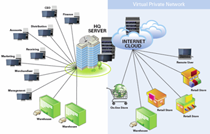
- Multi-company
- Multi-store/ multi-registers within one location
- Multi-user networking
back to top
Security
- Extensive password security system / user access levels
- Data storage and retrieval for unlimited number of years
back to top
Product Setup
- User definable product codes
- Manufacturer / supplier barcode scanning
- Multi-zone pricing
- Grid inventory (by colour/ size/ width etc.) for fashion apparel, footwear
- User definable product information
- Product image and sound recording for training, multi-media applications
- Definition and categorization (unlimited number of categories)
- Multiple suppliers per product
- Package sales
- Product kitting/ assembly
- Tag-along products
- Discount by product groups
- Mass price updates (by groups)
- Non-inventory items and services
- Spiffs and commissions attached directly to products
back to top
Kitting/Assembly
- Defines kits, such as gift baskets
- Creates new product codes
- Calculates kit cost and modifies total retail price
- Checks inventory when manufacturing kits
back to top
Inventory
- Purchase orders
- Receiving (via scanner/ handheld computer)
- Barcode printing
- Adjustments
- Physical counts
- Model stock (min-max) monitoring
- Auto replenishment
- Auto purchase orders
- Stock balancing
- Distribution
- Perpetual inventory for multiple locations and warehouse
- Transactions recorded by date, product number, location
- Inventory reports by quantity, cost, retail, potential gross profit margins
- Product information can include weight, shelf/bin location, tax status, supplier remarks
back to top
Cost & Price
- Supplier, landed or average cost for each product
- Utilize supplier price lists to generate landed costs using multiplier
- Unlimited price levels by customer group or date sensitive promotions
- Original price or current price can by used for retail value of inventory
- Selling prices in different currencies based on store locations anywhere in the world
back to top
Accounting Interface
- Available interface with Quickbooks, ACCPAC, Simply Accounting
- Accommodates your existing or preferred accounting system
- Eliminates need for double entries
back to top
Purchase Orders & Receiving
- Choice of manual or automated
- System generated purchase orders use model stocks or optional smart automatic P.O. preparation ( see below )
- Reports available on order status by product, supplier, or month
back to top
Model Stock/ Min/Max Stock Replenishment Method
- Pre-set ideal inventory levels by product and location is ideal for retailers who order repeat items
- Model stocks by store type allow multi-location operations to reduce data entry and monitoring
- Reports of shortages/overages in current on-hand-levels provides alerts for management
- Report also shows shortages/overages at different store locations to drive transfers of product from over-stocked stores to under-inventoried locations
- Ensures efficient use of inventory
- Reduces need for markdowns, prevents over ordering
back to top
Auto-Purchase Orders/ Distribution/ Stock Balancing
- Optional intelligent stock replenishment system
- Uses actual sales history to forecast needs to ensure stock is available when the customer wants to buy it


- System trips order points and sets minimum orders
- Numerous user definable settings, including past sales analysis, supplier lead times, trend over-rides, provides more accurate reordering parameters
- Supplier range, product groups, stores, multiplier factors, sales factors and reorder points can be specified to allow for adjustments to be made for season or economic climate
- Purchase orders/ recommended transfers are created and the user is given the opportunity to override the quantities indicated
- Once the Purchase Orders are finalized by the operator, the system prints them by supplier
- Recommended distribution list provided for goods received, with system re-calculating each store's requirement for the items received
- With the recommended transfer option, the system also prints recommended transfer list to ensure ideal distribution
back to top
Goods Received
- Receive products into inventory from outstanding purchase orders, back orders, or directly (without a P.O.)
- Accept entire order with one keystroke or change in the event of discrepancies
- Identify back ordered products, if policy allows
- Receive goods at POS terminals, at warehouse, or at back office
back to top
Barcode Printing
- Use 128A, code 3 of 9, or UPC standards
- Print barcodes from purchase orders, goods received, store inventory records or manually by product code
- Create system generated barcodes or unlimited manufacturer barcodes to increase efficiency of data
back to top
Transfers
- Manual or scanner data entry
- Handheld computers allow scanning and import to main server, eliminating possibility of errors
- Transfers can be initiated or completed on POS terminals or at back office
- Transfers can be completed at stores for increased efficiency
- Transfer reports allows monitoring from back office
- Real time communication ensures all locations can view and receive transfers instantly
- Ideal for auto-distribution, stock balancing, stock transfers (warehouse to stores/ store to store)
back to top
Physical Counts
- Physical count does not affect normal operations (eg. sales processing, goods receiving, transfers )
- System takes snapshot of inventory file that is used to compare to actual physical count
- Provides ample opportunity to enter, check and correct count entries
- Printed count sheets for manual inventory - ideal for inventory by department
- Handheld computers can be used to scan barcodes
- Data from handhelds can be imported to back office directly or via POS terminal
- Counted items report by store indicates onhand quantities, shortages/overages, cost & retail values of discrepancies
- Uncounted items report by location shows products overlooked or missing from the count
back to top
Reports
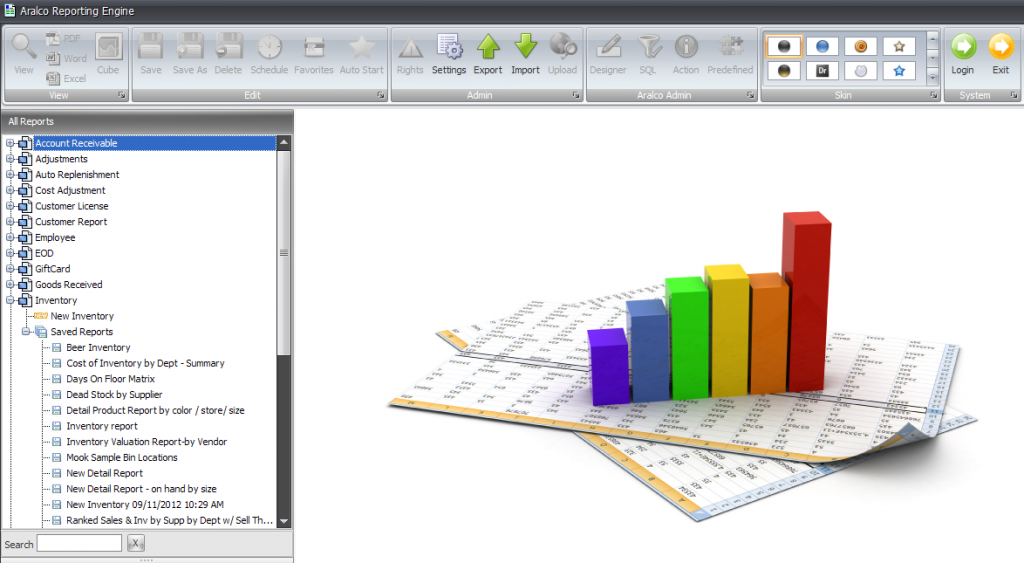
- Over 500 standard reports that can be further modified to user specifications
- User definable reports ensure level of detail not previously achievable
- Reports printed to file allow archival on disc
- View reports on screen, saving paper when hard copies are not required
- Print sections of report as needed
- Email or fax reports directly from system to end user
- Report filtering and group option allows user to specify information or date ranges to be included in report
- Graphical reports indicating comparative annual sales by Store, Zone, Province/State using Bar Graphs, Linear, 3D, Pie charts etc.
back to top
User Definable Screens
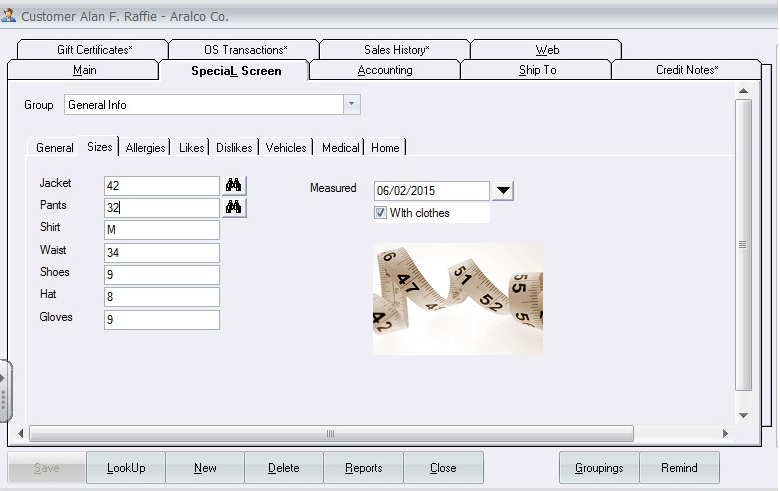
- Certain areas of the database such as Customer Profile, Product Profile and Special Transactions have been given new power by enabling the end user to create their own industry specific fields of information to help them customize and better fit the Aralco software for their business environment. For example, in the apparel retailing, you need to have your customer’s information such as size, color preference, likes and dislikes, however, in the health related industries you may want to know the patient’s age, allergies, medication currently being used, Physician’s name etc.
- Unlimited number of user fields can be attached to the customer, product and transaction files which would also be available to the Aralco report generator system. For example, you can then run reports to list customers name, address and phone numbers who are of a certain size, like a certain color and have no allergies to wool products and use this list for selective marketing.
back to top
Electronic Traffic Counter
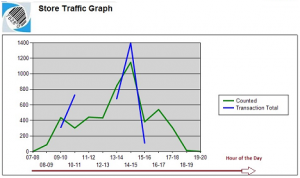
- Tallies number of store visits
- Option of running reports on the number of sales per visit
back to top
Excel/Word Interface
-
All Aralco reports are prepared as HTML (or ASCII) files and are readily exportable to Microsoft Excel or Word, where you can make any modification such as your own presentation or applications of formulas and other calculations.
-
For mass price updates, Aralco exports the selected product range (by Supplier, Department, Group etc.) then export and insert into Excel where you can easily manipulate the data at your convenience, then simply re-import your changes back into Aralco by a simple click. The product price information residing on the Aralco system will then be replace by your Excel sheets entries.
back to top
EDI Capabilities
- Exchange data between POS and Back Office System and external systems such as IBM AS400 and MAPICS to Aralco.
back to top
Ecommerce Package
- Real-time inventory adjustments over secure database (UDI)
- Automatically adjusts product information including, inventory levels, product pictures, descriptions and prices
back to top