
Retail pos software system
Advanced Business Solution
Inventory & Resource Management (ERP),
Point of Sale (POS),
Business Intelligence, CRM Systems

Features

Some of these features include:


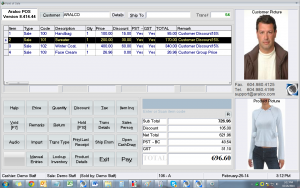
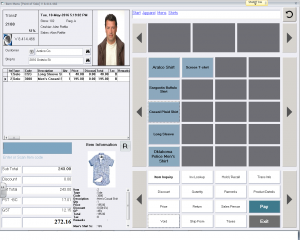
Customer Profile/Mailing/CRM

  • Fully user definable customer input screen allows collection of information that is as highly detailed as required
  • Retailers can obtain data about customer sizes, colour preferences, replacement product recipes, birth dates, etc. that provide a sophisticated CRM database
  • Wholesalers can establish in-house accounts for their clients and record credit, job details, and account information
  • Searches can be done by any data field
  • Access to customer sales histories help sales staff to improve client relationships
  • Targeted mailings are streamlined using system-generated letters, envelope labels, and emails
  • Qualify for discounted postal rates by grouping and sorting by postal or zip codes
  • Collect customer information during a transaction, or a later time or date
  • Membership or customer cards can be produced and issued to clients by phone number, account number or other such information

Listen and be proactive
Pay attention to what your clients and customers want and, when the time comes, let them know it's available. Try to keep exhaustive records of what customers have bought.. from ConnectIT e-magazine, Five steps to building business identity

20 March, 2005
by Jeff Wuorio

back to top

Moneris Payment Processing System

  • Fully integrates Aralco into a debit/credit card solution
  • Single point of contact for VISA, MasterCard, American Express, INTERAC Direct Payment
  • In-store to mobile to ecommerce
  • Low cost, high speed, secure payment processing methodology

back to top


Discounts

  • Flexible system, designed to handle different types of discounts:
    • Customer discount by percent / dollar for each item
    • Customer discount by percent / dollar for entire transaction
    • Staff discount (preset % available)
    • Preset customer discount %
    • Automatic application of date sensitive promotional discounts
    • Discount by price level stamped on customer file
  • Prompts discount explanation, maintaining control over staff-issued discounts

back to top


Taxes

  • Multiple taxation categories available ( PST, GST, VAT, federal & state taxes)
  • Any or all can be cancelled for any specific product during transactions
  • User definable taxes can be applied by customer, product
  • For stores in multiple states, provinces, or even countries, specific zones can be set up with the applicable taxes for each area

back to top


Price/On-hand Lookup

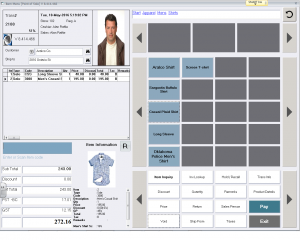
  • Search database by price, product number, supplier, etc. during any transaction
  • View inventory on-hand by product, store, or warehouse location
  • Identifies on-order and/or reserved stock
  • Information is constantly updated from back office and stores to allow for real-time lookups at any location

back to top


Transaction Voiding

  • Use of access rights allows only authorized staff to void specific items or entire transactions, even post payment
  • Reports of aborted and voided transactions are available at end of day

back to top


Transaction Parking

  • Entered items within a transaction can be placed on hold and recalled any time during the day

back to top


Sell Another Store's Stock

  • For sold-out items at one location, system can locate other stores with stock available
  • Sale can be completed at original store, but inventory will be removed from other location's stock
  • Ideal for high ticket items such as furniture, where item is delivered directly to customers' homes

back to top


Returns

  • System prompts operator for original purchase transaction information
  • Original receipt is retrieved from database to confirm actual selling price, discounts, taxes and customer information
  • Prompts operator for entry of reason for return

back to top


Split Commission

  • Transactions can be split between more than one staff member
  • Commissions can be user defined by product or dollar value of purchase
  • Unlimited parameters for spiffs, commissions, and staff bonuses

back to top


Tender Types

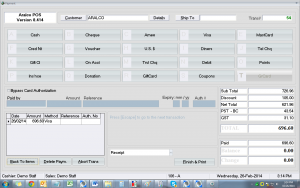
  • Standard methods of payment available, including cash, cheque, American Express, Visa, MasterCard, Debit card, vouchers, gift certificates, credit notes, etc.
  • User definable tender types also available
  • Payments by multiple foreign currencies can be accepted
  • Foreign currency is converted by user definable exchange rates, with change calculated in store currency

back to top


Account Customers

  • Ideal for retailers who carry their own paper
  • Customers can be set up with an in-house account to allow them to purchase goods & services on credit
  • Client information, credit limits and account balances are available at any location
  • System flags account at POS if customer exceeds credit limit
  • Customers can make payments against their accounts at any store POS register
  • Program instantly updates customer record and accounting system

back to top


Credit Notes

  • System generated credit notes with unique identifier can be issued or redeemed at POS of any location
  • Current balances are maintained at all locations due to real-time communications to back office and back to POS

back to top


Gift Certificates

  • Gift certificates can be purchased or redeemed at any location within the system
  • Purchased gift certificates are excluded in the regular store sales totals

back to top


Barcodes

  • Barcode readers, scanners and laser guns can be used to scan items at POS
  • Increase transaction entry speed and accuracy, eliminate operator errors
  • Scan barcodes for physical counts, goods receiving, and transfers done at the POS
  • For restaurant, café, and entertainment applications, programmable keyboards and touch screens provide ease of data entry

back to top


Layaways, Orders

  • Both options record customer information, identify products & due dates, and allow partial payments and deposits to be accepted at any location
  • System identifies layaways and orders at the start of day, prompting contact with the customer
  • Partial pickup, item additions and cancellations are easily accommodated

back to top


Quotes, Repairs

  • Quotes show customer information, product detail, and expiry date
  • Repair requisitions can be prepared with customer and product data, as well as "ready by" date

back to top


Product Rental

  • Optional module available to record rental transactions, including customer and product information
  • System calculates correct rental rates, and prompts operator on rental-return due dates
  • Items entered in a rental transaction are removed from inventory upon rental
  • Products returned are re-entered into inventory following positive identification by operator
  • User definable option allows the choice of deposit or full payment prior to rental items leaving store

back to top


Inter-store Transfers

  • Transfers can be initiated and entered at either POS or back office
  • Real-time communication ensures transfer is recorded at all locations
  • Receiving store can accept goods with a single keystroke or by entering the exceptions

back to top


Staff Information

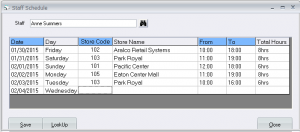
  • Staff codes can be set up to allow staff hours, transactions, and activity to be recorded
  • Information can be accumulated at the back office for reporting purposes
  • Payroll process is streamlined and double entry is eliminated with integration to accounting payroll modules

back to top


Electronic Eye

  • System option is connected to POS to track customer traffic rate for comparing to actual sales
  • More sophisticated option provides traffic/sales per hour and identifies staff present

back to top


Security

  • All critical functions are password-protected
  • User definable access levels ensure only authorized entry to specific areas
  • Passwords and access levels can be changed from back office as required

back to top


Reports

  • System generates reports detailing daily sales totals, sales by salesperson, peak selling periods, and more

back to top


Frequent Shopper Reward/Points System

  • Users can create multiple rewards plans for customers
  • Rewards can be linked to dollar value of purchases or to specific products
  • When customers make purchases at stores, reward points are generated at the back office, transmitted back to the POS, and printed boldly on the receipt
  • Points are also recorded on the customer file, so shoppers can request points balances at any location
  • Customers can redeem points at any store for goods, discounts, or other promotional items offered

back to top


Method of Payment Consolidation

  • All payments entered into system are recorded by tender category identifying quantity and value
  • Registered content of cash drawer can be displayed at any time, allowing cashiers to change during the day, without having to close

back to top


End of Day Session

  • Automated coin, cash & cheque tally assists with daily cash-out, by eliminating the need to manually calculate what is in the till ( no need for tally sheets or calculator )
  • System allow staff to perform several tally checks during the day
  • Operators are alerted of overages or shortages in cash immediately

back to top

Finger Scanning for access rights

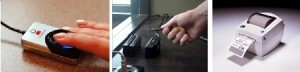
  • The finger scanning interface is available to identify staff at POS.
  • This identification is used for added security. Each staff member is registered with up to two finger scans.
  • Their access right to certain areas of the program will then allow them to enter into the authorized sections of the program.

back to top

Finger Scan for Clock-in & out and time attendance

  • Staff can “check-in & out” using the finger scanner to identify and register their attendance.
  • The system will automatically add all the hours attended by each staff and accumulates a daily tally to be used for payroll and other purposes.

back to top

Webcam support to take customer pictures

  • You can place a web-camera at POS or any back office station and take a picture to attach to the customer’s file.

back to top

Customer ID cards

  • Hard plastic card can be printer using special printers for customer.
  • Photos can be taken by the Aralco system and placed on the cards as well as any graphics provided.
  • The customer cards are scanned at POS via a magnetic stripe or a bar-coded identification on the card in order to access customer records.
  • This in turn will enable any special notes, warnings and account balance information on the customer.
  • The customer cards are also used at POS in the club member management system to track the member visits at each location by date and time.

back to top

Email invoice/ receipts to customers

  • For customers who require the invoice or receipt to be emailed, Aralco provides a direct link to the outlook or outlook express.

back to top

Gift Registry

  • Customers can register gifts for events such as weddings
  • Gifts can be purchased from any store
  • Registry is automatically updated

back to top

Gift Cards

  • Cards are scanned directly into the POS module
  • Cards can be designed using company logo
  • Barcodes supplied
  • No transaction fees for either loading or debiting from gift cards

back to top


Communication

  • POS transactions are transmitted to back office at the same time as back office server updates the POS
  • All customer account information, credit notes, gift certificates, product inventory, and frequent shoppers' points are updated on a real-time basis
  • Information available at all POS locations and at back office is current at all times

back to top


Unlimited Location

  • Capacity of POS registers, stores, and workstations is only limited by the hardware available to an organization

back to top


Home | Products | Services | Brochure | Client Login | Client Support | Contact Us| Sitemap

Aralco Point of Sale Systems - #212 / 828 Harbourside Drive, North Vancouver, BC, Canada V7P 3R9 ©2000-2008 | Resources

Franchise Opportunities